
AI-Ready Data: From 3★ to 5★ Open Data with AI
Mit KI aus 3★ Open‑Data‑Tabellen verlinkte 5★ Linked Open Data machen – für KI Systeme nutzbarer!
Bedarf/Problem und Zielgruppe
Viele Open Government Data Datensätze sind bereits öffentlich verfügbar – meist als CSV oder Excel.
Damit erreichen sie das 3-Star-Level im Open-Data-Modell: maschinenlesbar, aber noch nicht wirklich vernetzbar.
Was fehlt: • semantische Beschreibung der Daten • standardisierte Metadaten • Links zu anderen Datensätzen
Ohne diese Verknüpfungen bleiben OGD-Daten oft isolierte Tabellen, statt Teil eines vernetzten Wissenssystems zu werden.
Das Problem: Die Transformation zu 5-Star Linked Open Data ist heute meist viel Handarbeit.
(Nicht) verfügbare Daten
Es ist alles verfügbar - wir müssen uns nun darum kümmern, alle Teile zusammenzubringen, und 5-Stern Daten zu generieren 👍
Erwarteter Nutzen
Wenn das Problem gelöst wäre, könnten Open‑Government‑Data automatisch vernetzt und von KI-Systemen direkt verstanden und genutzt werden – statt nur als einzelne CSV‑Downloads zu existieren.
Ziel für den Hackathon
Ziel: Während des Hackathons möglichst viele 3★ Open‑Government‑Data‑Datensätze automatisiert zu 5★ Linked Open Data anreichern und für KI‑Systeme nutzbar machen. Dabei die Pipeline testen und vielleicht sogar verbessern 😇
Lösungsansätze
Lösungsansätze • Automatische Generierung von semantischen Metadaten für OGD‑Datensätze • Umwandlung von Tabellen (CSV/Excel) in Linked Open Data (RDF / Knowledge Graph) • Automatisches Linking zu bestehenden OGD‑Datensätzen oder Referenzdaten • Nutzung von KI/LLMs, um Datenschemata zu verstehen und Ontologien vorzuschlagen • Aufbau einer Pipeline, die Datensätze direkt für KI‑Systeme nutzbar macht
Was wir bereits ausprobiert haben • Entwicklung eines KI‑gestützten Tools, das Datensätze analysiert und Metadaten generiert • erste automatische Vorschläge für semantische Strukturen und Links zwischen Datensätzen • Tests mit bestehenden OGD‑Datensätzen (z. B. aus data.bs.ch) • Integration der aufbereiteten Daten in den Melody Bot als Proof‑of‑Concept
Hier das github Repo mit der KI.-basierten Pipeline: https://github.com/opendatabs/ogd-to-lod
Da drauf findet ihr auch das erste Intro Video: https://www.youtube.com/watch?v=AbhaA7YhF3g
Hier das neuste Video, welches den Stand des Projekts Ende letzter Woche zeigt:
Einschränkungen
Nur offene Daten, offene Lizenzen, offene und dokumentierte Lösungen einsetzen, damit die Ergebnisse nach dem Hackathon weiter ausgebaut werden können.
Nachhaltigkeit
Die Ergebnisse werden an Fachtagungen wie den Schweizerischen Statistiktagen publiziert, damit weitere Institutionen von der Lösung profitieren können, und das LOD System Schweiz sich schneller entwickelt.
OGD to LOD
Prototype — version 0.1. This tool is under active development. Expect rough edges, breaking changes, and incomplete features.
AI-assisted tool that turns Open Government Data (OGD) CSV files into Linked Open Data (LOD) mappings — from raw spreadsheet to a validated YARRRML/RML mapping ready to publish, with minimal manual effort.
Demo
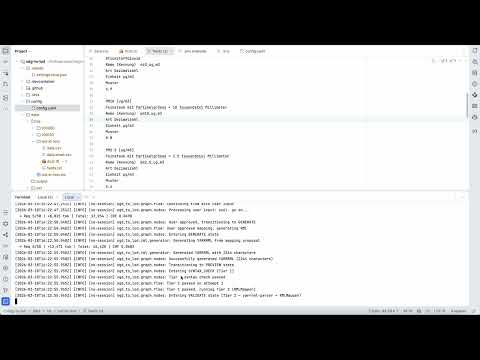
What it does
Publishing government data as Linked Open Data requires creating RDF mappings that describe how each CSV column maps to semantic concepts. This is tedious, error-prone, and requires both RDF expertise and deep knowledge of the dataset. OGD to LOD automates this step.
Given a CSV file and optional metadata, the tool:
- Parses the CSV (auto-detects encoding and delimiter) and reads any provided context files (DCAT, Markdown, plain text, JSON — any mix)
- Normalizes context using AI into a unified internal model with per-column descriptions, inferring missing descriptions from column names and sample values
- Proposes a mapping structure (dimensions, measures, datatypes) for user review before generating anything
- Generates a YARRRML mapping targeting the cube.link and schema.org vocabularies
- Validates the mapping with a two-tier pipeline: YAML syntax check followed by a Docker-based yarrrml-parser + RMLMapper execution
- Opens a GitHub PR in the target mappings repository with the generated
mapping.yarrrml.yamland the CSV source file
The result is a human-reviewable pull request that can be merged, adjusted, or rejected — the AI does the heavy lifting, a human stays in control.
Installation
Prerequisites
- Python 3.11+
- Docker (for full two-tier validation with yarrrml-parser and RMLMapper)
Setup
-
Clone the repository:
git clone https://github.com/redlink-gmbh/ogd-to-lod.git cd ogd-to-lod -
Create a virtual environment:
python -m venv venv source venv/bin/activate # On Windows: venv\Scripts\activate -
Install dependencies:
pip install -e ".[dev]" -
Configure environment variables:
cp .env.example .env # Edit .env with your credentials -
Configure the application:
# Edit config/config.yaml with your settings
Configuration
The application uses a YAML configuration file (config/config.yaml) with environment variable substitution.
Required Environment Variables
| Variable | Description |
|---|---|
APP_GITHUB_TOKEN |
GitHub Personal Access Token with repo scope |
AZURE_OPENAI_ENDPOINT |
Azure OpenAI endpoint URL |
AZURE_OPENAI_KEY |
Azure OpenAI API key |
Optional Environment Variables
| Variable | Description | Default |
|---|---|---|
GITHUB_REPO |
Target repository for generated mappings | redlink-gmbh/ogd-to-lod-mappings |
LOG_LEVEL |
Logging level (DEBUG, INFO, WARNING, ERROR) |
INFO |
HUWISE_DOMAIN |
Huwise domain used to derive https://<domain>/api/explore/v2.1 (required only with --dataset-id) |
unset |
HUWISE_API_KEY |
Huwise Automation API key for tests/e2e/push-to-huwise.sh |
unset |
Configuration File
github:
  repo: "org/repo-name"
  token: "${APP_GITHUB_TOKEN}"
  mappings_folder: "mapping"  # Parent folder for all mappings (default: mapping)

azure:
  endpoint: "${AZURE_OPENAI_ENDPOINT}"
  api_key: "${AZURE_OPENAI_KEY}"
  deployment: "gpt-4"

sparql:
  # endpoint: "http://localhost:3030/test/query"  # SPARQL linker — early stage, disabled by default

rml:
  base_uri: "https://example.org/resource/"
  rmlmapper_use_docker: true
  rmlmapper_docker_image: "rmlio/rmlmapper-java:latest"
  yarrrml_parser_docker_image: "rmlio/yarrrml-parser:latest"
SPARQL linker (early stage). When a
sparql.endpointis configured, the tool queries it for existing cube.link properties and DefinedTerms to reuse instead of minting new ones. This feature is experimental and disabled by default — leavesparql.endpointcommented out (or unset) to skip the lookup entirely.
Running inside Docker
A Dockerfile and root docker-compose.yml are provided so the CLI can
run without a local Python install. The container talks to the host's
Docker daemon via a bind-mounted socket and spawns yarrrml-parser /
rmlmapper-java as sibling containers — there is no
docker-in-docker, and no --privileged flag is needed.
To make sibling-container bind mounts work, the project directory is
mounted at the same absolute path inside the container as on the host,
and Python's TMPDIR is pointed at ${PWD}/.work. That way a path the
app emits (e.g. /Users/you/proj/.work/tmpXYZ) means the same thing to
the host daemon.
# Build the image once:
docker compose build

# Optional: bring up Fuseki alongside (same config as tests/e2e):
docker compose --profile fuseki up -d

# One-shot run against the bundled example (interactive prompts work
# under `compose run`):
docker compose run --rm ogd-to-lod \
    example/weather-binningen-hourly/data.csv \
    --output-folder weather-binningen-hourly \
    --context example/weather-binningen-hourly/dcat.ttl \
              example/weather-binningen-hourly/fields.txt \
    --local

# One-shot run with dataset bootstrap (downloads CSV + metadata first):
docker compose run --rm ogd-to-lod \
    --dataset-id 100051 \
    --local
Credentials come from .env (same variables as the native install).
Usage
ogd-to-lod <csv_path> --output-folder <folder> [--context FILE ...]
# or
ogd-to-lod --dataset-id <id> [--output-folder <folder>]
Arguments
| Argument | Description |
|---|---|
csv_path |
Path to the CSV file to map (required for file-path mode) |
--dataset-id ID |
Dataset identifier for bootstrap mode. The CLI downloads CSV + metadata from Huwise before running the normal workflow. |
--output-folder FOLDER |
Target subfolder name in the mappings directory. Required for file-path mode; defaults to --dataset-id in dataset mode. |
--context FILE [FILE ...] |
One or more context files describing the dataset. Any format is accepted: DCAT (JSON-LD, Turtle, RDF/XML), Markdown, plain text, JSON, or combinations thereof. |
Options
| Flag | Short | Description |
|---|---|---|
--config |
-c |
Path to configuration file (default: config/config.yaml) |
--base-uri |
-b |
Base URI for generated resources (overrides config) |
--local |
Write results to results/<timestamp>-<output-folder>/ instead of opening a GitHub PR |
|
--dataset-id |
Bootstrap CSV/context from Huwise API using dataset id | |
--help |
Show help message |
Examples
The bundled example under example/weather-binningen-hourly/ contains a
small CSV (data.csv), the full CSV (data.csv), a DCAT
description (dcat.ttl), and a plain-text column glossary
(fields.txt):
# CSV only (no context)
ogd-to-lod example/weather-binningen-hourly/data.csv \
    --output-folder weather-binningen-hourly \
    --local

# With a DCAT metadata file
ogd-to-lod example/weather-binningen-hourly/data.csv \
    --output-folder weather-binningen-hourly \
    --context example/weather-binningen-hourly/dcat.ttl \
    --local

# With multiple context files (DCAT + column documentation)
ogd-to-lod example/weather-binningen-hourly/data.csv \
    --output-folder weather-binningen-hourly \
    --context example/weather-binningen-hourly/dcat.ttl \
              example/weather-binningen-hourly/fields.txt \
    --local

# Override base URI
ogd-to-lod example/weather-binningen-hourly/data.csv \
    --output-folder weather-binningen-hourly \
    --context example/weather-binningen-hourly/dcat.ttl \
    --base-uri https://example.org/data/ \
    --local

# Dataset bootstrap mode (requires HUWISE_DOMAIN)
ogd-to-lod --dataset-id 100051 --local
Dataset Bootstrap Mode (--dataset-id)
When --dataset-id is used, the CLI derives the base URL (derived_base_url) as:
https://<HUWISE_DOMAIN>/api/explore/v2.1
Then it runs a setup phase before the mapping flow:
- fetches dataset metadata JSON from
<derived_base_url>/catalog/datasets/{id} - fetches CSV export from
<derived_base_url>/catalog/datasets/{id}/exports/csv - fetches DCAT Turtle from
<derived_base_url>/catalog/exports/ttl?where=dataset_id="{id}" - generates a
fields.jsoncontext file from the datasetfieldsschema
Setup artifacts are written under .work/dataset_setup/<timestamp>-<dataset-id>/ and then passed into the existing pipeline as local inputs.
If --dataset-id is set and HUWISE_DOMAIN is missing, the CLI aborts with an explicit error.
The resulting PR will contain two files in {mappings_folder}/{output-folder}/:
mapping.yarrrml.yaml— the generated YARRRML mapping{csv_filename}— the CSV source file
Local mode (--local)
Passing --local skips the GitHub PR and writes the results to a timestamped
folder at the project root instead:
results/<YYYYMMDD-HHMMSS>-<output-folder>/
├── mapping.yarrrml.yaml   # generated YARRRML mapping
├── data.csv                # CSV source file (always renamed to data.csv)
├── PR.md                   # PR description as Markdown
└── metadata.ttl            # static metadata (when generated)
The CSV is always written as data.csv so the YARRRML's {CSV_SOURCE}
placeholder has a predictable substitution target; the original source
filename is recorded in the header of PR.md. The results/ folder is
created on demand. No GitHub credentials are required in this mode.
Context Files
The --context flag accepts any number of files in any format. The AI normalizes all provided
files into a unified internal DatasetContext that includes:
- Dataset-level metadata: title, description, publisher, keywords, temporal/spatial coverage, license, etc.
- Column-level metadata: description and comment per CSV column header
Multiple files are merged — dataset-level fields use the first non-null value (DCAT files take precedence), while column descriptions are unioned across all files. Columns without explicit documentation are inferred by the AI from column names and sample values, and surfaced to the user during the mapping proposal step for review.
PR Template
The PR description is generated from a Markdown template (config/pr_template.md) using {{placeholder}} syntax.
Placeholder Syntax
{{Name}}— replaced with a dynamic value at render time{{Name|default value}}— uses the default if no value is provided
Available Placeholders
| Placeholder | Key | Type | Data Source |
|---|---|---|---|
{{Dataset Name}} |
dataset_name |
inline | Context title or mapping name |
{{Dataset Description}} |
dataset_description |
inline | Context description |
{{CSV Source}} |
csv_source |
inline | Public CSV URL |
{{Context Files}} |
context_files |
inline | Comma-separated list of all --context filenames |
{{Base URI}} |
base_uri |
inline | Base URI from config |
{{Mapping Decisions}} |
mapping_structure |
block | AI proposal (dimensions/measures) |
{{CSV Sample}} |
csv_preview |
block | Parsed CSV sample rows |
{{RDF Sample}} |
rdf_preview |
block | RMLMapper output |
Inline placeholders replace only the {{…}} token. Block placeholders replace the token and all example content below it (up to the next ### or --- boundary).
To add a custom placeholder, register it in _PLACEHOLDER_REGISTRY in src/ogd_to_lod/github/pr_template.py.
Development
Running Tests
pytest
Linting
ruff check .
ruff format .
Local Fuseki for testing
A Docker Compose file under tests/e2e/ starts a local Apache Jena Fuseki with an empty dataset named test, available at http://localhost:3030/test:
docker compose -f tests/e2e/docker-compose.yml up -d
End-to-end smoke test for --local results
Two helper scripts under tests/e2e/ exercise a folder produced by --local
against the local Fuseki:
# 1. Materialise the YARRRML mapping into observations.ttl
#    (replaces {CSV_SOURCE} with data.csv, runs yarrrml-parser + RMLMapper)
tests/e2e/run-mapping.sh results/<YYYYMMDD-HHMMSS>-<output-folder>

# 2. Upload observations.ttl and metadata.ttl to the local Fuseki
#    (defaults to http://localhost:3030/test/data, admin/admin)
tests/e2e/post-to-fuseki.sh results/<YYYYMMDD-HHMMSS>-<output-folder>

# Pass --clean to drop all existing triples (SPARQL `CLEAR ALL`) first:
tests/e2e/post-to-fuseki.sh --clean results/<YYYYMMDD-HHMMSS>-<output-folder>
run-mapping.sh expects exactly one CSV in the folder and writes
observations.ttl next to it. post-to-fuseki.sh uses Fuseki's Graph Store
Protocol with HTTP basic auth; override FUSEKI_URL /
FUSEKI_UPDATE_URL / FUSEKI_USER / FUSEKI_PASSWORD to point at a
different endpoint.
Push YARRRML to Huwise (Automation API)
After --local (or from a merged mapping/<folder>/mapping.yarrrml.yaml), push
the mapping into Huwise semantic.rml_mapping metadata:
# Verify semantic template + rml_mapping field on your portal
tests/e2e/push-to-huwise.sh --check

# From a results folder (HACKATHON.md Step 3)
tests/e2e/push-to-huwise.sh --dataset-id 100051 results/<timestamp>-<output-folder>

# From mappings-repo layout after merge
scripts/push-yarrrml-after-merge.sh --dataset-id 100051 mapping/<output-folder>
Requires HUWISE_DOMAIN and HUWISE_API_KEY in .env, plus host python3
with PyYAML (pip install -e .). Prepares ogd-to-lod YARRRML for the
Huwise TPF mapping dialect, then uses
Automation API
(PUT .../metadata/semantic/rml_mapping/ then POST .../publish_metadata/).
Verifies RDF via https://<HUWISE_DOMAIN>/api/tpf/<DATASET_ID>/ after publish.
Optional: GitHub Actions workflow .github/workflows/push-huwise-mapping.yml
(manual workflow_dispatch, or push to main under mapping/**/mapping.yarrrml.yaml
with repo variable HUWISE_DATASET_ID and secrets HUWISE_DOMAIN, HUWISE_API_KEY).
Project Structure
ogd-to-lod/
├── src/ogd_to_lod/
│   ├── __init__.py
│   ├── cli.py                   # CLI entry point
│   ├── config.py                # Configuration management
│   ├── parsers/
│   │   ├── models.py            # CSVData, DatasetContext, ColumnContext, …
│   │   ├── csv_parser.py        # CSV parsing (encoding/delimiter auto-detect)
│   │   ├── dcat_parser.py       # Deterministic DCAT/RDF parser (rdflib)
│   │   ├── context_parser.py    # Multi-file context reader (format detection)
│   │   └── context_normalizer.py# AI-based extraction → DatasetContext
│   ├── ai/                      # Azure OpenAI integration
│   ├── graph/                   # LangGraph conversation flow
│   ├── rml/                     # YARRRML generation (prompts, AI-driven generator)
│   ├── github/                  # GitHub PR creation (commits mapping.yarrrml.yaml)
│   └── validation/              # Two-tier validation (YAML syntax + Docker: yarrrml-parser → RMLMapper)
├── tests/
├── config/
│   ├── config.yaml
│   └── pr_template.md
├── scripts/                     # Utility scripts (worktrees)
├── pyproject.toml
└── README.md
License
MIT


Previous
GovTech Hackathon 2026
Next project